I know that you are still reeling from terms like 'Blog' and 'Wiki'...not to mention 'RSS and Atom'...or even 'Vlogs' (video blogs). Now new terms have been coined due to the rash of spammers who have branched out from email and are now posting unwanted and potentially harmful fake blog posts or comments. The term for this is 'Splogs', for Spam Blogs or 'Spings' (recalling that legitimate sites like Blogarithm can keep track of your interests by 'pinging' your email when a new post of interest comes up).
As a Blog administrator, these are more than annoying. There are methods to thwart the buggers (or Sploggers). Some sites ask for word verification, a particularly annoying method of asking you to read letters that are uneven and write them into a box before your post is published. While these usually workbecause 'bots' or robotic readers can't read them, frankly, neither can I, most of the time. Other methods allow for moderating comments or posts from anonymous sources. I prefer this method, so if someone is not registered as a Blog member, their posts go into a holding site that allows me to agree or not agree to publish them. Not foolproof, but not too bad either.
According to an article on InternetWeek.com by Christopher Heun:
"The people who create splogs - or, more accurately, the people who write the programs that do it for them - rarely intend for anyone to actually read their posts. They're just building a giant clump of links that refer back to some other site - that, say, promotes gambling or sells something like Viagra - and thus increases the page rank of that site on different search engines.
Then, in the odd chance that anyone might actually read their junk posts, the creators put ads on them that generate a small commission, usually a fraction of a dollar, for every click. "
The underlying factor is that if someone wants to annoy you, with a little effort, they can. Buggers.
Monday, April 24, 2006
Tuesday, April 18, 2006
English Instruction for Learning Disabled Adults
http://www.ericdigests.org/1996-1/esl.htm
This is an informative article written for the instructor trying to assess whether or not a student should be considered 'Learning Disabled'. It has a good section on understanding how ESL students studied in the past might be indicative of how they will study English. Many are not learning disabled, but instead have little or no educational experiences to draw from, which consequently puts them behind their peers. Bringing those education skills up can help the student succeed more quickly.
This is an informative article written for the instructor trying to assess whether or not a student should be considered 'Learning Disabled'. It has a good section on understanding how ESL students studied in the past might be indicative of how they will study English. Many are not learning disabled, but instead have little or no educational experiences to draw from, which consequently puts them behind their peers. Bringing those education skills up can help the student succeed more quickly.


ESL/IEI/VESL: All Levels: Conversation Lesson Plans
Conversation Lesson Plans for English Learners at All Levels
http://esl.about.com/od/conversationlessonplans/
Trying to find conversation starters for ESL is difficult at best. Here is a list of free English conversation lesson plans for beginning, intermediate and advanced levels of English learning in ESL classes as well as business English classes. Each lesson provides an introduction, step by step teaching guidelines and printable student worksheets.
http://esl.about.com/od/conversationlessonplans/
Trying to find conversation starters for ESL is difficult at best. Here is a list of free English conversation lesson plans for beginning, intermediate and advanced levels of English learning in ESL classes as well as business English classes. Each lesson provides an introduction, step by step teaching guidelines and printable student worksheets.
ESL/IEI/VESL: English for Business
http://esl.about.com/od/englishforbusinesswork/English for Business, Work and other Special Purposes
Adult Education English for special purposes including business, commercial, financial, legal, insurance and human resources sectors as well as help with resumes, job interviews and cover letters.
Adult Education English for special purposes including business, commercial, financial, legal, insurance and human resources sectors as well as help with resumes, job interviews and cover letters.
Informational: Center for Adult English Language Acquisition
The Center for Adult English Language Acquisition CAL is pleased to announce the opening of the Center for Adult English Language Acquisition (CAELA). CAL has received funding from the U.S. Department of Education, Office of Vocational and Adult Education to operate this center for three years (October 2004-September 2007).
The purpose of the Center is to assist states with emerging populations who are learning English as a second language (ESL). Center staff will work with state representatives so that they will have the capacity to promote the English language learning and academic achievement of adults learning English.
CAELA has replaced the National Center for ESL Literacy Education (NCLE), also housed at CAL, which (since 1989) has provided information and technical assistance to professionals who work with adult English language learners.
The purpose of the Center is to assist states with emerging populations who are learning English as a second language (ESL). Center staff will work with state representatives so that they will have the capacity to promote the English language learning and academic achievement of adults learning English.
CAELA has replaced the National Center for ESL Literacy Education (NCLE), also housed at CAL, which (since 1989) has provided information and technical assistance to professionals who work with adult English language learners.
Commentary: Sotir: Cool Tools

It's a bird, it's a plane...well, no, but it is cool. I wouldn't preclude the ability to fly in some later version... but while it won't fly just yet, it IS a Palm Treo PDA 700w smartphone...which starts at about $400. What makes this so cool? It runs Microsoft Windows Mobile Operating System (Windows XP), so you can download directly from your PC. It's a smartphone, which means that you can have a portable media player (like MP3), handheld computer (which can run Word and Excel and even PowerPoint) and it's a cell phone. How cool is that? Software developers are writing education oriented software specifically for these PDAs. You can keep grades and attendance on these. Student portfolios? No problem. Of course they are also a great PDA for use as a calendar, reminder, and all the other neat things that can be done on a wireless phone, including hooking up to the Internet. It can store files of just about any type. This is a techie's dream toy.
So what other kinds of tech toys can see their way into the classrooms? Well, consider iPods and MP3 devices. These little babies have taken the world by storm. So sure, you love them for playing your fav tunes, but in the classroom?? But of course. In addition to playing tunes, these little media players are small, relatively inexpensive (and dropping in price as we speak) and have a lot of memory in a compact space. On some, students can record video and audio (great for portfolios) and then download it to a computer, or play it as is. They can play electronic books. You can even use it to back up a hard drive, if you don't have a key drive handy. The bottom line is that the newest generation of computers don't much resemble their predecessors, and can truly revolutionize how computers can be used in a classroom.
Commentary: Sotir: New Horizons in Educational Technology
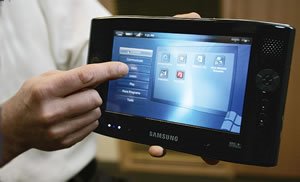
Ultra Mobile PC/Samsung

Look behind you...the latest and greatest new technologies are already creeping up! Check out the Ultra Mobile PC (UMPC) that will be available this summer. As with any new technology, the first versions of the products need some tweaking, such as extending the battery life. However, it is compact and much smaller than a laptop, which is a big draw for portability and storage. It comes pre-loaded with Microsoft's Touch Pack for Windows XP and weighs in under 2 pounds. It has a 7 inch LCD (bigger than a cell phone or Blackberry, but smaller than a laptop), has a 30-60GB hard drive and an average battery life of of about 2 hours per charge (THAT won't set well with the mobile techies!) Prices will range from $599 - 1000, and could include GPS features, Webcams, and digital TV tuners. You can use it by a touch screen, a stylus or a dedicated onscreen thumb keyboard. If you need more flexibility, you can hook up a regular keyboard and mouse via USB or BlueTooth.
So how could this be used by Adult Educators? In the soon to be new world (at least in Aurora) of free Wi-Fi, these can be used in our classrooms. Since they are small and light, they can be easily stored in a lockable cabinet in the classroom. They are more affordable, and therefore can fit more easily into budgets. This is a new direction in computing, and one that should seriously be considered. Rather than the current configuration of dedicated 'labs' which limit the amount of classroom space, any room could become a lab by bringing in a cart on wheels with portable computers inside. If you have a three hour class period, three classes can each be a 'lab' for an hour of that time. One set of these per department can be all that is needed to bring computers into the classrooms. It's a new world, but one worth exploring.
ABE/GED Math: Graphs
http://nces.ed.gov/nceskids/graphing/ Create a Graph
Complete site redesign featuring tabbed interface with active help, examples, and templates.
No number size limitations
Decimal values allowed
Data source name
Graphs can be saved and edited later
Better printing graphs
Print graphs with table of data
Graphs can be downloaded in many new file formats (PDF,JPG,PNG,SVG,EMF,EPS)
Hundreds of colors to choose from with new Color Picker tool
Choose from 10 different fonts for graph labels
Bubble and Scatter graphs added.
Up to 6 data groups with up to 50 items each.
Complete site redesign featuring tabbed interface with active help, examples, and templates.
No number size limitations
Decimal values allowed
Data source name
Graphs can be saved and edited later
Better printing graphs
Print graphs with table of data
Graphs can be downloaded in many new file formats (PDF,JPG,PNG,SVG,EMF,EPS)
Hundreds of colors to choose from with new Color Picker tool
Choose from 10 different fonts for graph labels
Bubble and Scatter graphs added.
Up to 6 data groups with up to 50 items each.
Monday, April 10, 2006
ABE/GED: Coping with Math Anxiety
http://www.mathacademy.com/pr/minitext/anxiety/ This site may have changed, and is now available on:
http://www.mathacademy.com/pr/index.asp
Good information in easy to understand format to help students with math anxiety.
http://www.mathacademy.com/pr/index.asp
Good information in easy to understand format to help students with math anxiety.
Wednesday, April 05, 2006
GED Math: Math Anxiety, Algebra, Study Skills, Learning Styles
http://www.mathpower.com/ MathPower.com
"This site provides information about basic math, algebra, study skills, math anxiety and learning styles and specifically addresses the needs of the community college adult learner. A student who is frustratedby college math can be helped by identifying his individual learning style and recognizing the instructor'steaching style. This site provides links for students and teachers to information about learning styles, study skills tips, and ways to reduce math anxiety and gives the students access to tutorials, algebra assignments, math videos, and a forum for discussing with the professor a variety of math topics."
There are also video snippets on algebra and pre-algebra topics. These are short videos to help students remember common topics. I really liked the student tutorials on math fundamentals and elementary algebra:
"Students helping students is an important part of classroom learning. On this page you will find links to math tutorials on varied elementary algebra topics authored by students to help others having difficulty with mathematics. "
This is an excellent site developed by a true teacher. Highly recommended.
"This site provides information about basic math, algebra, study skills, math anxiety and learning styles and specifically addresses the needs of the community college adult learner. A student who is frustratedby college math can be helped by identifying his individual learning style and recognizing the instructor'steaching style. This site provides links for students and teachers to information about learning styles, study skills tips, and ways to reduce math anxiety and gives the students access to tutorials, algebra assignments, math videos, and a forum for discussing with the professor a variety of math topics."
There are also video snippets on algebra and pre-algebra topics. These are short videos to help students remember common topics. I really liked the student tutorials on math fundamentals and elementary algebra:
"Students helping students is an important part of classroom learning. On this page you will find links to math tutorials on varied elementary algebra topics authored by students to help others having difficulty with mathematics. "
This is an excellent site developed by a true teacher. Highly recommended.
GED Math: Tech 21 Math Training Model
http://www.literacyonline.org/tm_math/index.html Tech 21 Math Training Model
" The purpose of this course is to explore technology-based resources and tools that can be used to bolster the math concepts tested by the GED. While identifying resources and tools is one part of this process, the more important parts are the teacher's ability:
to evaluate resources for their usefulness; and to consider how the resources could be used most effectively.
This course consists of 5 sessions. The first session provides a general overview of some of the larger issues related to teaching math to adults; the next 4 sessions focus on the topics of:
Problem Solving; Geometry, Spatial Sense, and Measurement; Data Analysis, Probability, and Statistics; and
Algebra.
Sessions 2-5 are similarly structured in that they consist of 2 sections that each raise an issue and require exploring particular websites to inform a response to that issue. "
" The purpose of this course is to explore technology-based resources and tools that can be used to bolster the math concepts tested by the GED. While identifying resources and tools is one part of this process, the more important parts are the teacher's ability:
to evaluate resources for their usefulness; and to consider how the resources could be used most effectively.
This course consists of 5 sessions. The first session provides a general overview of some of the larger issues related to teaching math to adults; the next 4 sessions focus on the topics of:
Problem Solving; Geometry, Spatial Sense, and Measurement; Data Analysis, Probability, and Statistics; and
Algebra.
Sessions 2-5 are similarly structured in that they consist of 2 sections that each raise an issue and require exploring particular websites to inform a response to that issue. "
GED Math: Instructor Resources
http://mathforum.org/teachers/adult.ed/ Math Forum at Drexel University
This page offers a selection of good sites to visit for information about adult numeracy. To find more recommendations, search or browse Teaching Issues/Strategies : Special Contexts : Adult Education in the Math Forum's Internet Mathematics Library.
This page offers a selection of good sites to visit for information about adult numeracy. To find more recommendations, search or browse Teaching Issues/Strategies : Special Contexts : Adult Education in the Math Forum's Internet Mathematics Library.
ESL: Teaching with Music
http://www.caslt.org/research/music.htm Teaching ESL through music
Compendium of sites that help instructors to teach ESL using music. Here are some online resources that can help you integrate music in ESL teaching.
Teaching with Music - Songs and Chants for Children Lyrics - Music Clip Art - Irish Music - Christmas Music Other Useful Music Resources - français - Español - Portuguêses
Other sites include:
http://www.eslpartyland.com/teachers/nov/music.htm "Take advantage of the power of music and use it in your ESL classes. We've created this page to provide resources, lessons, and ideas on teaching with music. There are printable materials for classroom use, lessons, lyrics, and ideas. We also have two discussion forums and links to other web sites about music. Get ready to jam."
http://www.forefrontpublishers.com/eslmusic/ "The new site now features additional articles supporting the use of music as well as an annotated bibliography of books and CD's that teachers will find particularly helpful when they use music to instruct English. As before, this site was created for educators who are interested in promoting the acquisition of English through music.
Here teachers are provided with the tools which they need in order to foster the acquisition of English through music. Therefore, in this site, teachers will find the following:
teacher-made and tested lesson plans materials such as books, videos, and tapes/CDs which have been helpful to other educators as they use music for second language instructional purposes articles supporting the use of music in the ESL classroom
Feel free to copy and disseminate information which you obtained from this Site to other "ESL-Music enthusiasts."
Compendium of sites that help instructors to teach ESL using music. Here are some online resources that can help you integrate music in ESL teaching.
Teaching with Music - Songs and Chants for Children Lyrics - Music Clip Art - Irish Music - Christmas Music Other Useful Music Resources - français - Español - Portuguêses
Other sites include:
http://www.eslpartyland.com/teachers/nov/music.htm "Take advantage of the power of music and use it in your ESL classes. We've created this page to provide resources, lessons, and ideas on teaching with music. There are printable materials for classroom use, lessons, lyrics, and ideas. We also have two discussion forums and links to other web sites about music. Get ready to jam."
http://www.forefrontpublishers.com/eslmusic/ "The new site now features additional articles supporting the use of music as well as an annotated bibliography of books and CD's that teachers will find particularly helpful when they use music to instruct English. As before, this site was created for educators who are interested in promoting the acquisition of English through music.
Here teachers are provided with the tools which they need in order to foster the acquisition of English through music. Therefore, in this site, teachers will find the following:
teacher-made and tested lesson plans materials such as books, videos, and tapes/CDs which have been helpful to other educators as they use music for second language instructional purposes articles supporting the use of music in the ESL classroom
Feel free to copy and disseminate information which you obtained from this Site to other "ESL-Music enthusiasts."
New IBT TOEFL test information
http://www.imakenews.com/toefl/e_article000289142.cfm?x=b11,0,w TOEFL Test Info
This is a good review of the changes from the previous version of the TOEFL test to the new, which was released in September 2005. The changes center mainly around the emphasis on grammar. The old test used grammar as the base, but the new version incorporates grammar and vocabulary within the Writing, Reading, and Speaking and Listening sections. There is also a 'test drive' section of this article, so you can see the changes in the test. Good information.
Lehigh University gives its ESL faculty the following information on the new test:
(http://www.lehigh.edu/~inesl/home/frameset.htm?forwardURL=/~inesl/Guide/newTOEFL.htm)
' Based on Communicative Language Pedagogy, the speaking test on the new TOEFL will cover these areas of communication:
Remembering the most important points in a lecture
Understanding instructor's directions about assignments and their due dates
Recognizing which points in a lecture are important and which are less important
Relating information that they hear to what they already know
There will be questions about personal knowledge subjects such as a familiar place or event and on a personal preference about a situation. For the academic speaking questions, students will be asked to listen to academic conversations, university lectures, and readings on academic subjects. Students will need to respond fluently and coherently to problems that are based on the information that they've heard. '
Other good sites for information on the new test:
http://esl.about.com/b/a/205630.htm About.com
http://www.free-english.com/ FreeEnglish.com (includes free practice tests)
http://www.languagesystems.com/forum/FORUM.asp?FORUM_ID=32&gclid=CPv_qaKOloQCFT9rJAod9BwivA (free TOEFL help forum)
http://www.4tests.com/exams/examdetail.asp?eid=57 4tests.com: Practice tests
This is a good review of the changes from the previous version of the TOEFL test to the new, which was released in September 2005. The changes center mainly around the emphasis on grammar. The old test used grammar as the base, but the new version incorporates grammar and vocabulary within the Writing, Reading, and Speaking and Listening sections. There is also a 'test drive' section of this article, so you can see the changes in the test. Good information.
Lehigh University gives its ESL faculty the following information on the new test:
(http://www.lehigh.edu/~inesl/home/frameset.htm?forwardURL=/~inesl/Guide/newTOEFL.htm)
' Based on Communicative Language Pedagogy, the speaking test on the new TOEFL will cover these areas of communication:
Remembering the most important points in a lecture
Understanding instructor's directions about assignments and their due dates
Recognizing which points in a lecture are important and which are less important
Relating information that they hear to what they already know
There will be questions about personal knowledge subjects such as a familiar place or event and on a personal preference about a situation. For the academic speaking questions, students will be asked to listen to academic conversations, university lectures, and readings on academic subjects. Students will need to respond fluently and coherently to problems that are based on the information that they've heard. '
Other good sites for information on the new test:
http://esl.about.com/b/a/205630.htm About.com
http://www.free-english.com/ FreeEnglish.com (includes free practice tests)
http://www.languagesystems.com/forum/FORUM.asp?FORUM_ID=32&gclid=CPv_qaKOloQCFT9rJAod9BwivA (free TOEFL help forum)
http://www.4tests.com/exams/examdetail.asp?eid=57 4tests.com: Practice tests
Monday, March 06, 2006
ABE/ESL/VESL: Practical Money Skills for Life
http://practicalmoneyskills.com/english/index.php
Money skills is a necessary lesson for our students. This site has a lot of classroom resources for financial literacy education. It has lessons for all levels of students, from K through adult. The grades 7-12 level includes:
Teens (Grades 7–12) Click here for Special Needs lesson plans
• Introduction
Introduction
• Lesson One
Making Decisions
• Lesson Two
Making Money
• Lesson Three
The Art of Budgeting
• Lesson Four
Living on your Own
• Lesson Five
Buying a Home
• Lesson Six
Banking Services
• Lesson Seven
About Credit
• Lesson Eight
Credit Cards
• Lesson Nine
Cars and Loans
• Lesson Ten
The Influence of Advertising
• Lesson Eleven
Consumer Awareness
• Lesson Twelve
Saving and Investing
• Lesson Thirteen
In Trouble
• Lesson Fourteen
About Consumer Privacy
• Appendix
Appendix
There is a free student budget workbook that can be downloaded from the site. Also included are useful links to other sites. For example, in the lesson on Buying a home, the following links appear:
LESSON FIVE: Buying a Home
FannieMae Homepath
http://www.fanniemae.com/homebuyers/homepath/
Mortgage Information
http://www.bankrate.com/brm/rate/mtg_home.asp
Reverse Mortgages for Seniors
http://www.hud.gov/buying/rvrsmort.cfm
U.S. Dept. of Housing & Urban Development
http://www.hud.gov
Money skills is a necessary lesson for our students. This site has a lot of classroom resources for financial literacy education. It has lessons for all levels of students, from K through adult. The grades 7-12 level includes:
Teens (Grades 7–12) Click here for Special Needs lesson plans
• Introduction
Introduction
• Lesson One
Making Decisions
• Lesson Two
Making Money
• Lesson Three
The Art of Budgeting
• Lesson Four
Living on your Own
• Lesson Five
Buying a Home
• Lesson Six
Banking Services
• Lesson Seven
About Credit
• Lesson Eight
Credit Cards
• Lesson Nine
Cars and Loans
• Lesson Ten
The Influence of Advertising
• Lesson Eleven
Consumer Awareness
• Lesson Twelve
Saving and Investing
• Lesson Thirteen
In Trouble
• Lesson Fourteen
About Consumer Privacy
• Appendix
Appendix
There is a free student budget workbook that can be downloaded from the site. Also included are useful links to other sites. For example, in the lesson on Buying a home, the following links appear:
LESSON FIVE: Buying a Home
FannieMae Homepath
http://www.fanniemae.com/homebuyers/homepath/
Mortgage Information
http://www.bankrate.com/brm/rate/mtg_home.asp
Reverse Mortgages for Seniors
http://www.hud.gov/buying/rvrsmort.cfm
U.S. Dept. of Housing & Urban Development
http://www.hud.gov
ESL: HBeg to HInter: Annenberg Videos on Demand
http://www.learner.org/resources/series71.html?pop=yes&vodid=321741&pid=942#
Connect with English (by Annenberg) <http://www.learner.org/resources/series71.html> -- A video instructional series in English as a second language for college and high school classrooms and adult learners. It follows a 28 year old student from Boston who has a dream of being a singer.
You will need to register for this free site, and it does require a lot of computer memory/bandwidth for the videos. There are grammar lessons and you can purchase books to go along with the videos. Very clear and the actors speak clearly. There 25 half hour programs in Connect With English and each episode has two sections: the story and the discussion group to review and study the videos and learn grammar skills. These are copyrighted videos. It's an interesting way to study English for High Beginning to High Intermediate level students.
Connect with English (by Annenberg) <http://www.learner.org/resources/series71.html> -- A video instructional series in English as a second language for college and high school classrooms and adult learners. It follows a 28 year old student from Boston who has a dream of being a singer.
You will need to register for this free site, and it does require a lot of computer memory/bandwidth for the videos. There are grammar lessons and you can purchase books to go along with the videos. Very clear and the actors speak clearly. There 25 half hour programs in Connect With English and each episode has two sections: the story and the discussion group to review and study the videos and learn grammar skills. These are copyrighted videos. It's an interesting way to study English for High Beginning to High Intermediate level students.
ESL: English Learner Movie Guides
http://www.eslnotes.com/
Looking for a fun way for students to practice their English? Here's a great site for movie lovers! Each movie guide includes a look at the characters and the plot, and also includes a long list of vocabulary and culture notes. Just choose a movie from the movie menu, and then download it. (Use PDF if you want to print out the guide.)
Looking for a fun way for students to practice their English? Here's a great site for movie lovers! Each movie guide includes a look at the characters and the plot, and also includes a long list of vocabulary and culture notes. Just choose a movie from the movie menu, and then download it. (Use PDF if you want to print out the guide.)
ESL: Pronunciation for Students from Hong Kong
http://elc.polyu.edu.hk/cill/pronunci.htm
This is a pronunciation page especially suited for students from Hong Kong. The focus is on specific pronunciation problems.
This is a pronunciation page especially suited for students from Hong Kong. The focus is on specific pronunciation problems.
VESL: Tools for Learning
http://www.tv411.org/learning/
These are great tools for students. I especially liked the sessions on How to Use a Library, Preparing for the GED, Tips for Multiple Choice Questions and Time Management.
Check out these lessons:
Choosing What to Read
Community Resources
Explore Nutrition with Your Child
Finding the Right Resource
How to Use a Library
Knowing Your Learning Style
Preparing for the GED
Taking Medicine Responsibly
The Parts of a Book
Time Management
Tips for Multiple Choice QuestionsWords
These are great tools for students. I especially liked the sessions on How to Use a Library, Preparing for the GED, Tips for Multiple Choice Questions and Time Management.
Check out these lessons:
Choosing What to Read
Community Resources
Explore Nutrition with Your Child
Finding the Right Resource
How to Use a Library
Knowing Your Learning Style
Preparing for the GED
Taking Medicine Responsibly
The Parts of a Book
Time Management
Tips for Multiple Choice QuestionsWords
VESL: Tools for Learning
http://www.tv411.org/learning/
These are great tools for students. I especially liked the sessions on How to Use a Library, Preparing for the GED, Tips for Multiple Choice Questions and Time Management.
Check out these lessons:
Choosing What to Read
Community Resources
Explore Nutrition with Your Child
Finding the Right Resource
How to Use a Library
Knowing Your Learning Style
Preparing for the GED
Taking Medicine Responsibly
The Parts of a Book
Time Management
Tips for Multiple Choice Questions
Words from Other Languages
These are great tools for students. I especially liked the sessions on How to Use a Library, Preparing for the GED, Tips for Multiple Choice Questions and Time Management.
Check out these lessons:
Choosing What to Read
Community Resources
Explore Nutrition with Your Child
Finding the Right Resource
How to Use a Library
Knowing Your Learning Style
Preparing for the GED
Taking Medicine Responsibly
The Parts of a Book
Time Management
Tips for Multiple Choice Questions
Words from Other Languages
VESL/ABE: Resume Writing
Resumes: http://www.10minuteresume.com/ http://jobstar.org/tools/resume/ http://www.provenresumes.com/
Three sites to help your students write their own resumes.
Three sites to help your students write their own resumes.
Monday, February 27, 2006
Fun Trip: Springfield, IL, Lincoln Museum
http://www.alplm.org/museum/museum.html
I thought I knew a lot about Lincoln, especially since just having read Doris Kearns Goodwin's new book 'Team of Rivals' A weekend trip to Springfield made me realize that there is a lot more history than I knew. The new Lincoln Museum in Springfield is wonderful, and as you move from Lincoln's early days, to his election, to the Civil War, to the White House and finally to his assasination and funeral, you realize that you don't know everything there is to know.
I especially enjoyed the show 'Through Lincoln's Eyes', the hall of gossip (apparently Mr. Lincoln liked to swear, and most of Washington society disdained Mrs. Lincoln), and the various artifacts. I truly liked being able to touch the brass Lincoln life mask. Most men who have become President age dramatically within their term of office, but the changes in Lincoln's visage were stunning. The information on the Civil War was outstanding as well. It is difficult to believe that over 600,000 American souls were lost in that horrific war. I highly recommend it. It's about a 2 1/2 -3 hour trip directly south on the Interstate, and there are good hotels and restaurants in town. (I like Muldaner's, which is about 2 blocks from the museum). It's worth the visit!
I thought I knew a lot about Lincoln, especially since just having read Doris Kearns Goodwin's new book 'Team of Rivals' A weekend trip to Springfield made me realize that there is a lot more history than I knew. The new Lincoln Museum in Springfield is wonderful, and as you move from Lincoln's early days, to his election, to the Civil War, to the White House and finally to his assasination and funeral, you realize that you don't know everything there is to know.
I especially enjoyed the show 'Through Lincoln's Eyes', the hall of gossip (apparently Mr. Lincoln liked to swear, and most of Washington society disdained Mrs. Lincoln), and the various artifacts. I truly liked being able to touch the brass Lincoln life mask. Most men who have become President age dramatically within their term of office, but the changes in Lincoln's visage were stunning. The information on the Civil War was outstanding as well. It is difficult to believe that over 600,000 American souls were lost in that horrific war. I highly recommend it. It's about a 2 1/2 -3 hour trip directly south on the Interstate, and there are good hotels and restaurants in town. (I like Muldaner's, which is about 2 blocks from the museum). It's worth the visit!
Wednesday, February 15, 2006
FYI: Cranking up the Laptop
http://laptop.media.mit.edu/
One Laptop per Child, a non-profit group started by faculty at the Massachusetts Institute of Technology to design, manufacture and distribute inexpensive (about $100.00) hand-crankable Linux-based laptops for children around the world. The computers would be made by Taiwan based Quanta Computer Inc. and would initially produce 5-15 million units to be sold to governments in China, India, Brazil, Argentina, Egypt, Nigeria and Thailand and given free to children in those countries. When that phase is completed, other countries would be included.
The units are so energy efficient that hand-cranking alone would generate enough power for operation, and mesh networking will give many systems Internet access from one connection.
In my opinion this is a wonderful way to bring children from the entire world together, and I hope that schools in developed nations will interact with the countries who have been given this opportunity. This is a tremendous project and I wish them great success.
One Laptop per Child, a non-profit group started by faculty at the Massachusetts Institute of Technology to design, manufacture and distribute inexpensive (about $100.00) hand-crankable Linux-based laptops for children around the world. The computers would be made by Taiwan based Quanta Computer Inc. and would initially produce 5-15 million units to be sold to governments in China, India, Brazil, Argentina, Egypt, Nigeria and Thailand and given free to children in those countries. When that phase is completed, other countries would be included.
The units are so energy efficient that hand-cranking alone would generate enough power for operation, and mesh networking will give many systems Internet access from one connection.
In my opinion this is a wonderful way to bring children from the entire world together, and I hope that schools in developed nations will interact with the countries who have been given this opportunity. This is a tremendous project and I wish them great success.
Thursday, February 09, 2006
Daily Special: Constitution
Although this is posted on the bulletin board, I thought it would be helpful to review some of the Constituion materials that Char and Pat put together as a Daily Special. If you are looking for Constitution materials for students:
For Reading Levels 6.0 and lower:
Origins of the Constitution CD (30 minutes)
America's Story Video (3 minutes each)
Ben Franklin
George Washington
Pre-GED Advantage Social Studies
Lesson 2: A New Nation
Lesson 7: Foundations of Democracy
Lesson 8: Branches of Government
For reading levels above 6.0:
GED Advantage Social Studies
1. U.S. History
Lesson 1: Building a Nation
2. Political Science
Lesson 1: American Democracy
Lesson 2: The Federal Government
For all reading levels:
Online Constitution Study Guide
For Reading Levels 6.0 and lower:
Origins of the Constitution CD (30 minutes)
America's Story Video (3 minutes each)
Ben Franklin
George Washington
Pre-GED Advantage Social Studies
Lesson 2: A New Nation
Lesson 7: Foundations of Democracy
Lesson 8: Branches of Government
For reading levels above 6.0:
GED Advantage Social Studies
1. U.S. History
Lesson 1: Building a Nation
2. Political Science
Lesson 1: American Democracy
Lesson 2: The Federal Government
For all reading levels:
Online Constitution Study Guide
ESL/IEI: English Grammar Exercises
http://www.easyenglish.com/index.asp Easy English
This site has a lot of free grammar quizzes and tests to help students study everything from present tense to modals.
Here are some more suggestions to help you learn English free: Check out English Club, where you'll find free ESL lessons on grammar, vocabulary, pronunciation, listening, speaking, reading, writing and more. Read about the history of English, and how to earn English. Join ESL Forums for lots of discussion in and about English. Use the ESL Help Desk if you have questions about English. Subscribe to 7 Secrets for ESL Learners for free English tips and lessons to your email box. Find English schools to study English in your country or abroad.
This site has a lot of free grammar quizzes and tests to help students study everything from present tense to modals.
Here are some more suggestions to help you learn English free: Check out English Club, where you'll find free ESL lessons on grammar, vocabulary, pronunciation, listening, speaking, reading, writing and more. Read about the history of English, and how to earn English. Join ESL Forums for lots of discussion in and about English. Use the ESL Help Desk if you have questions about English. Subscribe to 7 Secrets for ESL Learners for free English tips and lessons to your email box. Find English schools to study English in your country or abroad.
ESL/IEI: English Grammar Exercises
http://www.englisch-hilfen.de/en/index.htm Learning English Online
This is a German site, but is a great source for English grammar explanations and exercises. The English Forum is in German, so you may not want to go there unless you speak German. The quizzes are in English, and students can enter and score their results online. They are also designated as 'easy' or 'medium'. There is quite a comprehensive list of grammar subject areas to review, as well as explanations. Students can take more comprehensive tests ('complex') or even practice English with games such as Hangman or Find the Pairs.
This is a German site, but is a great source for English grammar explanations and exercises. The English Forum is in German, so you may not want to go there unless you speak German. The quizzes are in English, and students can enter and score their results online. They are also designated as 'easy' or 'medium'. There is quite a comprehensive list of grammar subject areas to review, as well as explanations. Students can take more comprehensive tests ('complex') or even practice English with games such as Hangman or Find the Pairs.
IEI/Adv. ESL/GED: Writing
http://grammar.ccc.commnet.edu/grammar/index.htm Guide to Grammar and Writing: Dr. Charles Darling, Capital Community College Foundation
This is a comptehensive site for writing skills, including topics from levels such as:
word and sentence level, paragraph level, essay and research paper level and also some good grammar quizzes that are scored online.
This is a comptehensive site for writing skills, including topics from levels such as:
word and sentence level, paragraph level, essay and research paper level and also some good grammar quizzes that are scored online.
Monday, February 06, 2006
ESL/IEI/Tutoring: Pronunciation: Canadian Raising
http://www.yorku.ca/twainweb/troberts/raising.html
Another site to help students identify various accents and dialects. This is on the familiar Canadian sound (also prevalent in some areas of WI and MI) call Canadian Raising. Not a large site, but the examples are good and easy to access.
"Canadian raising is a phonological process characteristic of several varieties of Canadian English, in which the onsets of the diphthongs /ay/ and /aw/ raise to mid vowels when they precede voiceless obstruents (the sounds /p/, /t/, /k/, /s/, and /f/). Click on the speaker icons below to hear genuine examples of Canadian raising."
Another site to help students identify various accents and dialects. This is on the familiar Canadian sound (also prevalent in some areas of WI and MI) call Canadian Raising. Not a large site, but the examples are good and easy to access.
"Canadian raising is a phonological process characteristic of several varieties of Canadian English, in which the onsets of the diphthongs /ay/ and /aw/ raise to mid vowels when they precede voiceless obstruents (the sounds /p/, /t/, /k/, /s/, and /f/). Click on the speaker icons below to hear genuine examples of Canadian raising."
ESL/IEI/Tutoring: Pronunciation: PBS: Do You Speak American English?
http://www.pbs.org/speak/seatosea/americanvarieties/southern/sounds/
PBS Do You Speak American English?
"The good news: It’s widely known. The bad news: Known for what? Guy Bailey and Jan Tillery report on the pluses and minuses of Southern American English in the popular imagination. (The research cited in this essay was first published in 2000.)" The site also includes discussions on the following dialects:
African American English
Smoky Mountains
¡Spanglish!
Texan
Californian
Cajun
Chicano English
Lumbee
Midwest
New York City
Pacific Northwest
Pittsburghese
There is also a dialect quiz (great for group work), take a regional dare and Radio America, all of which give audio examples of the various dialects. A fun site, and useful for Pronunciation classes.
PBS Do You Speak American English?
"The good news: It’s widely known. The bad news: Known for what? Guy Bailey and Jan Tillery report on the pluses and minuses of Southern American English in the popular imagination. (The research cited in this essay was first published in 2000.)" The site also includes discussions on the following dialects:
African American English
Smoky Mountains
¡Spanglish!
Texan
Californian
Cajun
Chicano English
Lumbee
Midwest
New York City
Pacific Northwest
Pittsburghese
There is also a dialect quiz (great for group work), take a regional dare and Radio America, all of which give audio examples of the various dialects. A fun site, and useful for Pronunciation classes.
ESL, IEI, Tutoring: Phonics: The Sounds of American English
http://www.uiowa.edu/~acadtech/phonetics/about.html# Phonetics, The Sounds of American English, University of Iowa, Site contact: kaspar-stromme@uiowa.edu
Created in 2003, this site addresses the sounds of American and Spanish English, and also Articulatory Anatomy (in both English and Spanish). Requires a Quick Time plug-in and newer Operating System (OS). Somewhat slow to load but worth the wait. There is also a helpful troubleshooting section.
• Launch Spanish Library
• Launch English Library
• Articulatory Anatomy
Created in 2003, this site addresses the sounds of American and Spanish English, and also Articulatory Anatomy (in both English and Spanish). Requires a Quick Time plug-in and newer Operating System (OS). Somewhat slow to load but worth the wait. There is also a helpful troubleshooting section.
• Launch Spanish Library
• Launch English Library
• Articulatory Anatomy
Tuesday, January 31, 2006
ESL/ABE: Writer's Window
http://english.unitecnology.ac.nz/writers/home.html Writer's Window
An interactive site for students to share and comment on writing and also write collaborative stories. Students can share their writing and poetry, add to continuous stories or join a discussion on writing. There is an excellent 'how to' area: http://english.unitecnology.ac.nz/writers/workshop.html where students can get tips and techniques on writing. There is also a fun 'Reader's Cafe': http://english.unitecnology.ac.nz/readerscafe/cafeflash.php
with a book quiz, reading shelf and sharing page, with sections for teachers as well.
An interactive site for students to share and comment on writing and also write collaborative stories. Students can share their writing and poetry, add to continuous stories or join a discussion on writing. There is an excellent 'how to' area: http://english.unitecnology.ac.nz/writers/workshop.html where students can get tips and techniques on writing. There is also a fun 'Reader's Cafe': http://english.unitecnology.ac.nz/readerscafe/cafeflash.php
with a book quiz, reading shelf and sharing page, with sections for teachers as well.
All: ReadWriteThink: Online Learning
http://www.readwritethink.org/: International Reading Association (IRA), National Council Teachers of English (NCTE), MarcoPolo Education Foundation
This site provides various lesson plans for integrating Internet content into literacy lessons.It includes grade appropriate lesson plans (reading levels K-12) and applies NCTE/IRA standards.
You can search for lessons by reading level, literacy strand or literacy engagement.
There is also an extensive list of web resources:(http://www.readwritethink.org/resources/index.asp)
This site provides various lesson plans for integrating Internet content into literacy lessons.It includes grade appropriate lesson plans (reading levels K-12) and applies NCTE/IRA standards.
You can search for lessons by reading level, literacy strand or literacy engagement.
There is also an extensive list of web resources:(http://www.readwritethink.org/resources/index.asp)
Thursday, January 26, 2006
Commentary: Sotir: State of the Art vs. State of the Use
There are a lot of educational blogs out in the blogosphere, and I try to visit some of my favorites regularly (though I wish more would have RSS feeds so I can track updates easier). One recently poses an interesting thought: Technology for What? A Preconceptual Sketch by Robert Heiny (http://tabletpceducation.blogspot.com/) I hate to say it, but having been involved with technology for more than 20 years, he has a point. He asks a series of questions, including:
Do teachers agree that increasing (or maximizing) student learning rates is our top daily priority?What compelling ideal or practical purpose do state-of-the-art technologies serve in student learning?
Do some interests merely want the newest gismos in schools whether or not anyone needs them?
Which imperatives relevant to novice and scholarly learning drive technology evangelists to promote the use of new technologies, such as use of digital ink and wireless connections, to increase learning?
Heady questions, all. As a self-confessed tech evangelist, I’ve asked similar questions. If education existed, and thrived, in the pre-technological revolution era, why do we need technology now? What purpose does it serve? Is it necessary? The simple answer is no, education without technology can be done effectively, as generation after generation proved. One of the most compelling arguments to make in favor of technologically-enabled classrooms is that today’s students demand it. That is true, since many of these technologies were created before today’s students were born, which makes it part of the societal fabric of their lives. They don’t know life without cable, cell phones, or computers. It just IS.
But for me, as manager of an academic technology lab, the question moves more from having state-of-the-art to how we use those tools effectively, which I call state-of-the-use. When I wrote to the original RFP for a Center of Excellence grant for the Illinois Community College Board in 1992, the general feeling was that technology was important, but the question was ‘why?. The Centers of Excellence were charged with being the state models for technology in education. And I doubt that I, or likely any of my colleagues, knew exactly why we needed it. But we had a vision of the future, saw the potential for technology, and set out as if we were explorers of a vast, previously uncharted universe.
As a Center of Excellence, we worked to first define what constituted technological excellence. New hardware and software was delivered almost daily, all amazing and all very expensive. It made sense to give funds to a few to explore the options for the many. And explore we did. Within months of receiving the grant, I was plunged headlong into a world that I had never seen before. Laser disk programs sold for $ 5000 -10,000 per station. Computers cost that and more. Vendors came out of the woodwork trying to convince me that their software was the best of the best. We had any and all adult educational software as it became available. It was overwhelming for my staff of specialists, who were charged with making sense of it all.
Eventually, we returned back from the future to the common sense of the past. We had a meeting and I said listen, all of this is wonderful and amazing and exciting. But we are teachers. How will this make us better? More importantly, how will it make students learn more effectively? We came upon a series of realizations that we still employ in the Center today. First, technology is a tool. It’s like a book or a blackboard or a lecture. It’s nothing more than an additional tool that teachers can employ, when it is needed, and when it is most effective.
Second, teachers won’t use anything that is difficult to access. Change is common, but in education, comes slowly. The way to get teachers to use it is to take away all the layers of difficulty, and make it as easy to use as a book or a blackboard. When students had slates, they were used much as paper had been used in the past. When the first blackboard was put behind a teacher, suddenly the idea developed of using it to explain not to one student but an entire classroom of students. It may have been extremely low-tech, but it revolutionized how teachers teach. You need to think the same way when designing technology for a classroom. It absolutely has to be invisible to be effective. So we brainstormed on the problems teachers had with technology. We came up with solutions. For example, no instructor had the time or inclination to read 500 page software manuals. We determined that teachers needed to know how to get into, through and out of the software programs. We developed QuickNotes, which are one page (hard and fast rule) telling them how to get into, move through and exit the programs. The QuickNotes increased software usage almost 300% in the first 6 months.
Third, teachers need to see a reason to use the technology. We considered the various learning styles of our students and developed a series of Individual Educational Plans (IEP) for every level student who accessed the Center. Any student from any class program could come into the Center and learn what they needed when they needed it. We cross-correlated the software with the classroom curricula, so that students could have it correspond exactly with what they were currently learning and could choose various programs from the same skill sets that presented the information in a variety of learning styles. And teachers needed to only know the class level of the student to point them to the correct software sections. Teachers saw the value that technology offered their students. Student attendance jumped dramatically once they knew they could get the information they needed quickly and easily.
Finally, we determined the need for patience. As a more recent example, I started using blogs as the main communication tool for the Center a couple of years ago, replacing email and the mailbox stuffed with outdated memos. Blogs are archived, and searchable, and they don't clog up mailboxes. The information is there, when you need it and when you want it, and is available anywhere you have access to the Internet. The teachers took to using a blog slowly, but eventually, it became the tool I originally envisioned it being, once the value was established.
Technology for the sake of technology simply will not be used by teachers. They are too busy, and sometimes too reluctant to use something foreign and difficult to understand. But if you make the tool invisible, give it a purpose and a value, then new ideas can and will be embraced. We don’t need to have the newest state-of-the-art. We need to have the best state-of-the-use. We need to spend less money getting the newest and the best, and spend more on developing the uses of the equipment we do buy. Technology still in the virtual box is nothing more than a waste of resources. Get it out, and get it used.
Commentary: Sotir: KISS: Keep it Simple, Stupid
Stuck in the office on a cold and snowy day, I started pondering why the U. S., which has all but single-handedly created the technological revolution, has faltered so badly in getting academia to take the lead in developing it for the classroom. Certainly, there are a lot of creative, innovative people doing amazing things in many classrooms across the country. But the MAJORITY of educators just don't get it. They moved from the blackboard to the overhead projector, but many have been hit with a wall of complacency when new technologies burst on the scene. These are good people, with good intentions of providing quality education for their students. But the thought of using any new technology is resisted.
I'll give an example. The tablet PC has been around for a while. So has email. Teaching writing is difficult, and many teachers hate having to drag all the papers home to grade. Students hate to wait for a week to get the corrections to their papers, and see where they can improve. Let's put a tablet pc in the hands of that instructor. Let's assume that she has an open mind. Now let's have the students write their draft writing assignments on their computers, and put them in a Word document. At any time, day or night, weekend or holiday, when finished, they can email that Word doc to their instructor. At any time, day or night, weekend or holiday, whenever the instructor sits down to grade papers, those papers are right there on her tablet PC. She switches to the tablet, and opens up one of her students' assignments. She picks up the pen and makes the corrections, and then emails the document back to the student. The student, with any kind of computer, can see the comments and make the corrections, finish the final draft of the assignment and email it off to the instructor. That can be the end of it, or the instructor can open up the assignments in the classroom, and use them (with a projector) to help instruct the students to improve their writing through example.
There are also programs that, in a wireless classroom where all the students and instructor have tablets, can let each student correct sentences or rewrite paragraphs. The instructor sees all the reponses on her tablet, and can choose a few of the examples, show them to the class and further improve their understanding of what constitutes a good writing assignment. Since this is on a website, students can download and print any of the examples for themselves. So much easier than using a blackboard, and so much more advanced than using an overhead projector. Now, someone just needs to find that open minded instructor and get her the tools, and instruction on how to use them. And she has to be an evangelist for change, and a mentor to others who still fear new technologies. As the saying goes, try it, you just may like it.
I'll give an example. The tablet PC has been around for a while. So has email. Teaching writing is difficult, and many teachers hate having to drag all the papers home to grade. Students hate to wait for a week to get the corrections to their papers, and see where they can improve. Let's put a tablet pc in the hands of that instructor. Let's assume that she has an open mind. Now let's have the students write their draft writing assignments on their computers, and put them in a Word document. At any time, day or night, weekend or holiday, when finished, they can email that Word doc to their instructor. At any time, day or night, weekend or holiday, whenever the instructor sits down to grade papers, those papers are right there on her tablet PC. She switches to the tablet, and opens up one of her students' assignments. She picks up the pen and makes the corrections, and then emails the document back to the student. The student, with any kind of computer, can see the comments and make the corrections, finish the final draft of the assignment and email it off to the instructor. That can be the end of it, or the instructor can open up the assignments in the classroom, and use them (with a projector) to help instruct the students to improve their writing through example.
There are also programs that, in a wireless classroom where all the students and instructor have tablets, can let each student correct sentences or rewrite paragraphs. The instructor sees all the reponses on her tablet, and can choose a few of the examples, show them to the class and further improve their understanding of what constitutes a good writing assignment. Since this is on a website, students can download and print any of the examples for themselves. So much easier than using a blackboard, and so much more advanced than using an overhead projector. Now, someone just needs to find that open minded instructor and get her the tools, and instruction on how to use them. And she has to be an evangelist for change, and a mentor to others who still fear new technologies. As the saying goes, try it, you just may like it.
ESL/IEI: Oxymorons
http://www.oxymorons.info/ Oxymorons.Info
An Oxymoron is a combination of contradictory or incongruous words, such as 'Cruel Kindness' or 'Jumbo Shrimp' (Jumbo means 'large' while Shrimp means 'small'). It is a literary figure of speech in which opposite or contradictory words, terms, phrases or ideas are combined to create a rhetorical effect by paradoxical means. This is a fun, interactive site to discuss oxymorons. The oxymoron of the day on the day I checked out this site was 'tax-refund'. Since I was in the process of getting things together for the tax man...it seemed an appropriate choice. Instructors could do a lot with these, and it would be a great way to start or end a class.
An Oxymoron is a combination of contradictory or incongruous words, such as 'Cruel Kindness' or 'Jumbo Shrimp' (Jumbo means 'large' while Shrimp means 'small'). It is a literary figure of speech in which opposite or contradictory words, terms, phrases or ideas are combined to create a rhetorical effect by paradoxical means. This is a fun, interactive site to discuss oxymorons. The oxymoron of the day on the day I checked out this site was 'tax-refund'. Since I was in the process of getting things together for the tax man...it seemed an appropriate choice. Instructors could do a lot with these, and it would be a great way to start or end a class.
ESL/IEI: Web English Teacher
http://www.webenglishteacher.com/ Web English Teacher
While created for any English students, this site brings a lot of resources to ESL students as well. For example, on the vocabulary site, there are the following areas:
1000 Most Common Words in English This page has the first 250. Follow links to the entire list.
All America Reads: Vocabulary Strategies Three approaches based on the work of Kylene Beers.
Best Practices: Teaching Vocabulary Classroom activities and resources, a model lesson on video, and an online development session for vocabulary instruction.
The Clarifying Routine: Elaborating Vocabulary Instruction This strategy is designed for LD students but will work with all students on multiple grade levels.
Teaching Vocabulary: Two Dozen Tips and Tricks A variety of approaches for a wide range of grade levels
While created for any English students, this site brings a lot of resources to ESL students as well. For example, on the vocabulary site, there are the following areas:
1000 Most Common Words in English This page has the first 250. Follow links to the entire list.
All America Reads: Vocabulary Strategies Three approaches based on the work of Kylene Beers.
Best Practices: Teaching Vocabulary Classroom activities and resources, a model lesson on video, and an online development session for vocabulary instruction.
The Clarifying Routine: Elaborating Vocabulary Instruction This strategy is designed for LD students but will work with all students on multiple grade levels.
Teaching Vocabulary: Two Dozen Tips and Tricks A variety of approaches for a wide range of grade levels
ESL/IEI: Everything ESL/ Lesson Plans
http://www.everythingesl.net/lessons/ Everything ESL
44 content based ESL lesson plans for beginning through intermediate students, including topics such as:
How Weather Affects Our Lives Cold winter weather in the Northeast region of the United States provides an excellent opportunity to teach a unit on weather to my ESL students. Includes classroom resource picks.
Lincoln's Birthday: February 12th Introduce the concepts of slavery and the Civil War when studying this famous American President. Includes downloadable activities and classroom resource picks.
President's Day: George Washington Have students celebrate George Washington's on President's Day, February 21st. This is also a good time to teach about the first U.S. flag and the American colonies. Teach students to sing Yankee Doodle Dandy. Includes downloadable activities and classroom resource picks.
Snow Similes Understanding how poets use words to paint pictures is a concept that can be taught to young students. The key is to start with an easy simile that is very visual. The combination of a big snowstorm and hands-on materials made this lesson successful. Includes downloadable activities and classroom resource picks.
Valentine's Day Hearts Have a heart! Use Valentine's Day to give your students an interesting opportunity to learn and use figurative language in English. Includes downloadable activities
Activities downloads requires Acrobat Reader to be installed. These lesson plans can be used and adapted for a variety of situations, and offer good academic projects. When I taught ESL, I learned that the concept of Valentine's Day was foreign to most students. The lesson plan included on this site addresses many of the heart related idioms that confuse students year round. Imagine an ESL student trying to make sense of idioms such as:
to cry your heart out - to cry a lot and feel really badly about something
to eat your heart out - to be jealous of someone
from the bottom of your heart - to really mean something
to have a change of heart -to change your mind
to have a heart - to be compassionate, to care about other people
44 content based ESL lesson plans for beginning through intermediate students, including topics such as:
How Weather Affects Our Lives Cold winter weather in the Northeast region of the United States provides an excellent opportunity to teach a unit on weather to my ESL students. Includes classroom resource picks.
Lincoln's Birthday: February 12th Introduce the concepts of slavery and the Civil War when studying this famous American President. Includes downloadable activities and classroom resource picks.
President's Day: George Washington Have students celebrate George Washington's on President's Day, February 21st. This is also a good time to teach about the first U.S. flag and the American colonies. Teach students to sing Yankee Doodle Dandy. Includes downloadable activities and classroom resource picks.
Snow Similes Understanding how poets use words to paint pictures is a concept that can be taught to young students. The key is to start with an easy simile that is very visual. The combination of a big snowstorm and hands-on materials made this lesson successful. Includes downloadable activities and classroom resource picks.
Valentine's Day Hearts Have a heart! Use Valentine's Day to give your students an interesting opportunity to learn and use figurative language in English. Includes downloadable activities
Activities downloads requires Acrobat Reader to be installed. These lesson plans can be used and adapted for a variety of situations, and offer good academic projects. When I taught ESL, I learned that the concept of Valentine's Day was foreign to most students. The lesson plan included on this site addresses many of the heart related idioms that confuse students year round. Imagine an ESL student trying to make sense of idioms such as:
to cry your heart out - to cry a lot and feel really badly about something
to eat your heart out - to be jealous of someone
from the bottom of your heart - to really mean something
to have a change of heart -to change your mind
to have a heart - to be compassionate, to care about other people
ESL: Diagramming Sentences
http://members.cox.net/teachro/ English Grammar Website
While most American schools have given up on diagramming sentences, ESL students, who are taught English largely through grammar, might do well to bring back diagramming exercises. The advantage of diagramming is that relationships of words in a sentence make more sense when shown in a pattern. English is a difficult language...any assistance in making it easier to understand is appreciated and embraced by foreign students.
While most American schools have given up on diagramming sentences, ESL students, who are taught English largely through grammar, might do well to bring back diagramming exercises. The advantage of diagramming is that relationships of words in a sentence make more sense when shown in a pattern. English is a difficult language...any assistance in making it easier to understand is appreciated and embraced by foreign students.
Literacy: Commonly Misspelled Words
http://www.what2learn.com/content/samples/Literacy/literacy.htm
These games have been created to help students learn the spellings of the words highlighted in the KS3 National Strategy as those most commonly misspelled by Year 7 students. For literacy level students, this is an engaging format for studying spelling.
These games have been created to help students learn the spellings of the words highlighted in the KS3 National Strategy as those most commonly misspelled by Year 7 students. For literacy level students, this is an engaging format for studying spelling.
Monday, December 19, 2005
Harvard University/Collaborative Curriculum Design Tool
http://learnweb.harvard.edu/ccdt/
The CCDT (Collaborative Curriculum Design Tool) is an online tool which suports the production of curricula which foster student learning through the application of the principles of Teaching for Understanding. There are tutorials which cover a single topic such as 'Starting with Designs' and consist of movies containing actual CCDT screen shots.
Using this tool, you can work an a collaborative curriculum with people from across the campus to a across the world. A wonderful tool for learning and curriculum design.
The CCDT (Collaborative Curriculum Design Tool) is an online tool which suports the production of curricula which foster student learning through the application of the principles of Teaching for Understanding. There are tutorials which cover a single topic such as 'Starting with Designs' and consist of movies containing actual CCDT screen shots.
Using this tool, you can work an a collaborative curriculum with people from across the campus to a across the world. A wonderful tool for learning and curriculum design.
Thursday, December 08, 2005
ABE/GED: Math Skills: SOS Math
http://www.sosmath.com/index.html
Browse our more than 2,500 Math pages filled with short and easy-to-understand explanations - from simplifying fractions to the cubic formula, from the quadratic equation to Fourier series, from the sine function to systems of differential equations - this is the one stop site for your math needs.
You want more? Check out our CyberExams to prepare for a test, or ask a question on our popular CyberBoard!
Lots of math, presented in lots of ways. I didn't see any Spanish translations, but the actual skills are presented well.
Browse our more than 2,500 Math pages filled with short and easy-to-understand explanations - from simplifying fractions to the cubic formula, from the quadratic equation to Fourier series, from the sine function to systems of differential equations - this is the one stop site for your math needs.
You want more? Check out our CyberExams to prepare for a test, or ask a question on our popular CyberBoard!
Lots of math, presented in lots of ways. I didn't see any Spanish translations, but the actual skills are presented well.
Spanish GED: Practioner's Viewpoint: NCSALL
http://www.ncsall.net/?id=405
A discussion on the Spanish GED, problems and ideas for success. This is a site for instructors, and not students, but can help focus your program. Short and well written.
http://www.ncsall.net/index.php?id=404
Changing Approaches to Math: A discussion of how to teach math skills to low reading level students and students working towards a GED.
A discussion on the Spanish GED, problems and ideas for success. This is a site for instructors, and not students, but can help focus your program. Short and well written.
http://www.ncsall.net/index.php?id=404
Changing Approaches to Math: A discussion of how to teach math skills to low reading level students and students working towards a GED.
GED/Spanish GED: Videos for Purchase
http://www.ket.org/enterprise/gedprep/ged_espanol.htm
KET has a series of 43 videos, some print materials and Handy Math Formulas, both in Spanish and English. There are also workbooks that can be purchased.
KET has a series of 43 videos, some print materials and Handy Math Formulas, both in Spanish and English. There are also workbooks that can be purchased.
General: All Curricula: Internet 101
http://www.internet101.org/
Internet 101 is a simple to read instruction manual for using the Internet. Course areas include:
About The Internet About The Web About Email About Browsers About Viruses About Chatting About File Sharing About Online Shopping About Searching
Great forLiteracy and ESL students, and it offers a good foundation for learning all of the basic concepts of the Internet. This is just enough knowledge to get you started without having to deal with all the details that many courses include.
Internet 101 is a simple to read instruction manual for using the Internet. Course areas include:
About The Internet About The Web About Email About Browsers About Viruses About Chatting About File Sharing About Online Shopping About Searching
Great forLiteracy and ESL students, and it offers a good foundation for learning all of the basic concepts of the Internet. This is just enough knowledge to get you started without having to deal with all the details that many courses include.
General ESL/VESL: Online Multilingual Dictionaries
http://www.yourdictionary.com/diction1.html#multi
Dictionaries in many languages, and also many disciplines. This is THE site for finding dictionaries and thesauri online. There are also some obscure dicitionaries You never know when you might need:
1,000,000 Scrabble Links (huge 320K HTML file)
The Cliché Finder
Dictionary of Difficult Words (12,700 words in all fields)
A Little Etymology
A Glossary of Place Names of Indian Origin in Florida
Measurement Converters
Read the Bible in 55 Different Languages
Short Word Lists (the Words for 1-10) in 300+ Native American Languages
Spell Web See how popular your spelling is on the Web
Yak-Yak On-line Danish-English-Norwegian-Swedish Word Finder (Spellchecker)
but for other languages, these are good online dictionaries, including:
DICTSEARCH All-in-one Dictionary Search: Bulgarian, Catalan, Czech, Danish, Dutch, English, Estonian, Finnish, French, German, Hungarian, Indonesian, Italian, Norwegian, Portuguese, Russian, Slovene, Spanish, Swedish, and Turkish which translate from 69 source languages into 73 target languages.
Dictionaries in many languages, and also many disciplines. This is THE site for finding dictionaries and thesauri online. There are also some obscure dicitionaries You never know when you might need:
1,000,000 Scrabble Links (huge 320K HTML file)
The Cliché Finder
Dictionary of Difficult Words (12,700 words in all fields)
A Little Etymology
A Glossary of Place Names of Indian Origin in Florida
Measurement Converters
Read the Bible in 55 Different Languages
Short Word Lists (the Words for 1-10) in 300+ Native American Languages
Spell Web See how popular your spelling is on the Web
Yak-Yak On-line Danish-English-Norwegian-Swedish Word Finder (Spellchecker)
but for other languages, these are good online dictionaries, including:
DICTSEARCH All-in-one Dictionary Search: Bulgarian, Catalan, Czech, Danish, Dutch, English, Estonian, Finnish, French, German, Hungarian, Indonesian, Italian, Norwegian, Portuguese, Russian, Slovene, Spanish, Swedish, and Turkish which translate from 69 source languages into 73 target languages.
Tuesday, November 22, 2005
Adv. ESL/IEI: Great Speeches: Structuring a Great Speech
http://www.pbs.org/wgbh/amex/monkeytrial/sfeature/sf_lucas.html
Stephen E. Lucas is Evjue-Bascom Professor in the Humanities and Professor of Communication Arts at the University of Wisconsin-Madison. In 1999, he surveyed his peers to compile a list of the top 100 American speeches of the twentieth century. The list, co-compiled with Prof. Martin Medhurst of Texas A&M University, reflects the opinions of 137 leading scholars of American public address.
Lucas is also the author of The Quotable George Washington and a textbook, The Art of Public Speaking. Here he discusses good speechmaking, and the speaking skills of William Jennings Bryan and Clarence Darrow.
This is good, basic information for students, and can help them organize their thoughts more coherently. For example:
"One basic structure for a speech falls into three parts: an introduction, a body, and a conclusion. Each part is designed to do something different. You need to have an introduction that gets the audience's attention and lets people know about the importance of the subject, why it's important for them to listen. It makes a first impression. In journalism they call it a "hook": something that's going to pull your audience in to your speech. The introduction should also reveal the speech's topic and give the audience some idea of the main points to be discussed.
The body of the speech is where the speaker develops his or her main points -- the big ideas of the speech. You should probably limit yourself to 4 or 5 main points in a speech, whether it's a 10-minute or a 60-minute speech. That will give you time to develop the points you're making. If you have too many main points, the audience will have trouble sorting them out and you may find that you aren't able to develop them in enough depth to be clear and convincing."
Stephen E. Lucas is Evjue-Bascom Professor in the Humanities and Professor of Communication Arts at the University of Wisconsin-Madison. In 1999, he surveyed his peers to compile a list of the top 100 American speeches of the twentieth century. The list, co-compiled with Prof. Martin Medhurst of Texas A&M University, reflects the opinions of 137 leading scholars of American public address.
Lucas is also the author of The Quotable George Washington and a textbook, The Art of Public Speaking. Here he discusses good speechmaking, and the speaking skills of William Jennings Bryan and Clarence Darrow.
This is good, basic information for students, and can help them organize their thoughts more coherently. For example:
"One basic structure for a speech falls into three parts: an introduction, a body, and a conclusion. Each part is designed to do something different. You need to have an introduction that gets the audience's attention and lets people know about the importance of the subject, why it's important for them to listen. It makes a first impression. In journalism they call it a "hook": something that's going to pull your audience in to your speech. The introduction should also reveal the speech's topic and give the audience some idea of the main points to be discussed.
The body of the speech is where the speaker develops his or her main points -- the big ideas of the speech. You should probably limit yourself to 4 or 5 main points in a speech, whether it's a 10-minute or a 60-minute speech. That will give you time to develop the points you're making. If you have too many main points, the audience will have trouble sorting them out and you may find that you aren't able to develop them in enough depth to be clear and convincing."
Monday, November 21, 2005
ESL/ABE/GED/IEI: Confusing Words
http://www.confusingwords.com/
Confusing Words is a collection of 3210 words that are troublesome to readers and writers. Words are grouped according to the way they are most often confused or misused.
Some of these words are homonyms (words that sound alike but are spelled differently) and some are just commonly confused. There is a search engine to find specific words.
Confusing Words is a collection of 3210 words that are troublesome to readers and writers. Words are grouped according to the way they are most often confused or misused.
Some of these words are homonyms (words that sound alike but are spelled differently) and some are just commonly confused. There is a search engine to find specific words.
GED: History: A Century of Great African American Speeches
http://americanradioworks.publicradio.org/features/sayitplain/
Say it Plain: A Century of Great African American Speeches
(also see review on AELC Constitution Blog http://constitutionaelc.blogspot.com/
of the speech by Clarence Thomas from this site, posted on 11/22/05)
From Booker T. Washington and Marcus Garvey to Clarence Thomas and Barack Obama, a history of great African American speeches. There is a historical context, the transcript of the speech, and a Real Player rendition of the actual speech.
"The transcripts on this Web site were drawn from the accompanying recordings. In some cases, we were able to start with existing transcripts in the public domain and check them against the recordings. In other instances, we produced the transcripts ourselves with the help of dedicated colleagues.
On some occasions, the available text of a speech differed from the recording. Speakers commonly diverge from their written texts, which are sometimes speeches they give repeatedly, but no one takes the time to document the extemporaneous remarks. Each transcript here has been checked against the recordings by at least two sets of ears. But occasionally, words in some of the recordings can be difficult to hear. We've used our best judgment to make the most faithful transcripts we can."
There is a book available, and also an hour long documentary is available via podcast on site. Sponsored by American RadioWorks and American Public Media. This would be a wonderful tool for Black History Month.
Say it Plain: A Century of Great African American Speeches
(also see review on AELC Constitution Blog http://constitutionaelc.blogspot.com/
of the speech by Clarence Thomas from this site, posted on 11/22/05)
From Booker T. Washington and Marcus Garvey to Clarence Thomas and Barack Obama, a history of great African American speeches. There is a historical context, the transcript of the speech, and a Real Player rendition of the actual speech.
"The transcripts on this Web site were drawn from the accompanying recordings. In some cases, we were able to start with existing transcripts in the public domain and check them against the recordings. In other instances, we produced the transcripts ourselves with the help of dedicated colleagues.
On some occasions, the available text of a speech differed from the recording. Speakers commonly diverge from their written texts, which are sometimes speeches they give repeatedly, but no one takes the time to document the extemporaneous remarks. Each transcript here has been checked against the recordings by at least two sets of ears. But occasionally, words in some of the recordings can be difficult to hear. We've used our best judgment to make the most faithful transcripts we can."
There is a book available, and also an hour long documentary is available via podcast on site. Sponsored by American RadioWorks and American Public Media. This would be a wonderful tool for Black History Month.
GED/ Others: Geography: National Geographic Lessons and Interactive Museum
http://www.nationalgeographic.com/xpeditions/lessons/06/g68/index.html
Xpeditions is a series of lesson plans by National Geographic on geographical subjects, laid out by grade level. There are also activities, an atlas, and an interesting interactive geographical museum called Xpedition Hall (an interactive “museum” that takes you on geography journeys. Here you’ll climb a mountain, hover over the Earth, speed across Europe, visit an archeological dig, and even order sushi–plus games, animations, and more!). For example, the room titled Human Systems includes Rail Traffic Controller : Traces railroad cargoes and destinations on a rail traffic control board. By tracking imports and exports, visitors can understand how countries become related through mutual dependence on raw materials and finished goods.
This is one of those sites that takes time to explore, and can be used in many ways. ESL students might use some of the Xpedition Hall sites at lower reading levels. ABE students can find reading level appropriate materials as well. GED students might study thind in context by exploring 'Culture Goggles' and seeing one city, Jerusulem, through the eyes of a Christian, a Muslim and a Jew. The videos and graphics are clear and easy to understand, and the reading levels are very helpful. Add your usage ideas to the comments.
Xpeditions is a series of lesson plans by National Geographic on geographical subjects, laid out by grade level. There are also activities, an atlas, and an interesting interactive geographical museum called Xpedition Hall (an interactive “museum” that takes you on geography journeys. Here you’ll climb a mountain, hover over the Earth, speed across Europe, visit an archeological dig, and even order sushi–plus games, animations, and more!). For example, the room titled Human Systems includes Rail Traffic Controller : Traces railroad cargoes and destinations on a rail traffic control board. By tracking imports and exports, visitors can understand how countries become related through mutual dependence on raw materials and finished goods.
This is one of those sites that takes time to explore, and can be used in many ways. ESL students might use some of the Xpedition Hall sites at lower reading levels. ABE students can find reading level appropriate materials as well. GED students might study thind in context by exploring 'Culture Goggles' and seeing one city, Jerusulem, through the eyes of a Christian, a Muslim and a Jew. The videos and graphics are clear and easy to understand, and the reading levels are very helpful. Add your usage ideas to the comments.
GED/Adv. ESL: History/Online Videos
http://www.nationalgeographic.com/history/
National Geographic and Windows XP present the following video profiles of people and societies who "started something" that had a significant impact on the development of modern civilization. Interesting videos from the Ancient Sumerians to more modern historical figures such as Thomas Edison, Wright Brothers, Marie Curie, and Alexander Graham Bell. Latest version of Windows Media Player and high-speed connection required. Clear pronunciation and easy to understand language within context. Can be used for Advanced ESL students for listening practice.
National Geographic and Windows XP present the following video profiles of people and societies who "started something" that had a significant impact on the development of modern civilization. Interesting videos from the Ancient Sumerians to more modern historical figures such as Thomas Edison, Wright Brothers, Marie Curie, and Alexander Graham Bell. Latest version of Windows Media Player and high-speed connection required. Clear pronunciation and easy to understand language within context. Can be used for Advanced ESL students for listening practice.
Hearing Impaired: US Department of Education site
http://www.cfv.org/stream.asp
The mission of the Captioned Media Program (CMP) is to provide all persons who are deaf or hard of hearing awareness of and equal access to communication and learning through the use of captioned educational media and supportive collateral materials. The CMP also acts as a captioning information and training center. The ultimate goal of the CMP is to permit media to be an integral part in the lifelong learning process for all stakeholders in the deaf and hard of hearing community: adults, students, parents, and educators.
The CMP provides a free-loan media program of over 4,000 open-captioned titles (videos, CD-ROM, and DVD). Deaf and hard of hearing persons, teachers, parents, and others may borrow materials. There are no rental, registration, or postage fees. Several hundred titles are also streamed on the CMP web site.
You will need to register with the site and verify that you have students who qualify for the program. There is a titles list on the site, and the service, including postage for mailing the captioned videos, CD's and DVD's to your program, is provided free of charge by the Department of Education. There are also some titles and information for Spanish speakers.
The mission of the Captioned Media Program (CMP) is to provide all persons who are deaf or hard of hearing awareness of and equal access to communication and learning through the use of captioned educational media and supportive collateral materials. The CMP also acts as a captioning information and training center. The ultimate goal of the CMP is to permit media to be an integral part in the lifelong learning process for all stakeholders in the deaf and hard of hearing community: adults, students, parents, and educators.
The CMP provides a free-loan media program of over 4,000 open-captioned titles (videos, CD-ROM, and DVD). Deaf and hard of hearing persons, teachers, parents, and others may borrow materials. There are no rental, registration, or postage fees. Several hundred titles are also streamed on the CMP web site.
You will need to register with the site and verify that you have students who qualify for the program. There is a titles list on the site, and the service, including postage for mailing the captioned videos, CD's and DVD's to your program, is provided free of charge by the Department of Education. There are also some titles and information for Spanish speakers.
Wednesday, November 16, 2005
Commentary: Sotir
There have been a lot of articles recently on the issue of connecting with the current generation of students. Whether you call them 'Digital Natives' or 'NextGen Students' or 'Millennial Students', these students form the fabric of future educational needs. They are used to multi-tasking, multi-media and multi-sensory approaches to learning. Because technology is pervasive, this style of learning, while championed by the young, is applicable to all ages. Seniors as well as teens use cell phones, text messaging, instant messaging and chat rooms, with varying degrees of proficiency. Ours is a media driven society that functions on instantaneous information. If you want to know how long a trip will be, message signs over highways let you know the approximate times to various end points. GPS systems guide you to the destination. Web-enabled cell phones can give you the current weather conditions and warnings.
As an academic institution, we need to embrace these societal changes and carry them into the classroom. Interconnectivity and communication tools are important to students as well as instructors. Students need to not only have information, but they need to know where additional information can be sought. While most institutions boast a website, the best of them have interactive sites that not only give general information but act as portals to other sources of information and learning opportunities. We have become a society of gatherers who 'Google' information when it is needed. It is imperative that we develop the tools our students need to learn. We should not limit our instructional methodologies to those that were effective in the past, but rather explore how new developments can be used in conjunction with the old to enhance the educational environment. Change should be the only constant.
As an academic institution, we need to embrace these societal changes and carry them into the classroom. Interconnectivity and communication tools are important to students as well as instructors. Students need to not only have information, but they need to know where additional information can be sought. While most institutions boast a website, the best of them have interactive sites that not only give general information but act as portals to other sources of information and learning opportunities. We have become a society of gatherers who 'Google' information when it is needed. It is imperative that we develop the tools our students need to learn. We should not limit our instructional methodologies to those that were effective in the past, but rather explore how new developments can be used in conjunction with the old to enhance the educational environment. Change should be the only constant.
Monday, November 07, 2005
Commentary: Sotir: What is VESL?
VESL stands for Vocational English as a Second Language. As the workplace diversity increase, so does the need to improve the ability of workers to communicate in English. Whether it is English training on the job site, or sponsoring a workers' educational program offsite, many companies are realizing the need to expand the skill base of their employees. VESL courses use similar lessons to a regular ESL class, but substitute work-based vocabulary and examples, or emphasize the skills necessary to complete certain job related activities (an example would be using math skills for estimation of amount of paint needed to paint a room). On this blog, a 'VESL' indication shows websites that address learning in this format.
ABE/GED: Science
http://www.firstscience.com/site/home.asp First Science. com
Interesting science articles, videos, photos (from sources such as Hubble), science games and quizzes. Also a fact file and science links for even more information. There are also 22 interesting web cams that can be viewed from this site.
Interesting science articles, videos, photos (from sources such as Hubble), science games and quizzes. Also a fact file and science links for even more information. There are also 22 interesting web cams that can be viewed from this site.
GED: Science and Math
http://scienceworld.wolfram.com/ Science World and Math World: Eric Weisstein
A huge site with a lot to explore, but specifically for advanced GED students . There are sections on Chemistry, Physics and Astronomy, as well as a section on Math from Algebra and higher. Would be too complicated for any but your best students who want more to explore.
Basic Math Areas:
Axioms (39)
Category Theory (47)
Logic (6)
Mathematical Problems (5)
Set Theory (11)
Theorem Proving (2)
Point-Set Topology@
A huge site with a lot to explore, but specifically for advanced GED students . There are sections on Chemistry, Physics and Astronomy, as well as a section on Math from Algebra and higher. Would be too complicated for any but your best students who want more to explore.
Basic Math Areas:
Axioms (39)
Category Theory (47)
Logic (6)
Mathematical Problems (5)
Set Theory (11)
Theorem Proving (2)
Point-Set Topology@
ABE/GED/VESL: Algebra: Translating Word Problems
http://www.purplemath.com/modules/translat.htm: Translating Word Problems: Purple Math
One of the most difficult skills for students is translating word problems into the correct formulas. This is a good site to walk them through the process.
One of the most difficult skills for students is translating word problems into the correct formulas. This is a good site to walk them through the process.
ABE,GED: Introduction to Algebra
http://www.mathleague.com/help/algebra/algebra.htm Introduction to Algebra:
Variables Expressions Equations Solution of an equation Simplifying equations Combining like terms Simplifying with addition and subtraction Simplifying by multiplication Simplifying by division Word problems as equations Sequences
Variables Expressions Equations Solution of an equation Simplifying equations Combining like terms Simplifying with addition and subtraction Simplifying by multiplication Simplifying by division Word problems as equations Sequences
ABE/GED: Everyday Math
http://www.math.com/homeworkhelp/EverydayMath.html: everyday Math, Math.com
Numbers, Ratios and Proportions, Factoring, all with unit quizzes, and also some calculators for:
Everyday Calculators · 5 functions · Basic · Air Distance · Driving Distance · File Download · Miles-Per-Gallon · Percent · Taxes · Payment · Mortgage
Numbers, Ratios and Proportions, Factoring, all with unit quizzes, and also some calculators for:
Everyday Calculators · 5 functions · Basic · Air Distance · Driving Distance · File Download · Miles-Per-Gallon · Percent · Taxes · Payment · Mortgage
VESL/ABE/GED: Construction Math
http://mathforum.org/%7esarah/hamilton/ham.contents.html: Math to Build On, Construction Math: A good review for students in the construction industry, or those looking for jobs in that field.
ABE/GED: Geometry
http://www.aplusmath.com/cgi-bin/flashcards/geoflash Geometry Flashcards...these are basic, but would be a good review or start up point for geometry study.
GED: Algebra
http://www.purplemath.com/modules/index.htm Practical Algebra Lessons from Purple Math: Basic, Intermediate, Advanced and Word Problems are all a part of this website.
ABE/GED/ESL/Literacy: Daily Math Skills
http://www.learner.org/exhibits/dailymath/ Recipes, home decor, money facts...these are some of the daily math skills taught on these pages.
ABE/GED: Math: Roman Numerals
http://www.gomath.com/htdocs/ToGoSheet/Algebra/roman.html A quick guide to Roman Numerals.
Thursday, November 03, 2005
Business: Advanced Students
http://www.executiveplanet.com/ International Business Culture, Business Etiquette, Customs and Protocol
Over 60 countries are represented on this site, with factual information on business culture and etiquette from each. This is a highly advanced course of study, but would be useful in an Intensive English program or high level ESL/VESL program.
There is also a section where you can post questions to the experts on intercultural business, share your experiences, or post comments on the site.
Over 60 countries are represented on this site, with factual information on business culture and etiquette from each. This is a highly advanced course of study, but would be useful in an Intensive English program or high level ESL/VESL program.
There is also a section where you can post questions to the experts on intercultural business, share your experiences, or post comments on the site.
ABE/GED/ESL/VESL: Resumes
Resumes:
http://www.10minuteresume.com
http://jobstar.org/tools/resume
http://www.provenresumes.com
Try the above sites for resume writing.
http://www.10minuteresume.com
http://jobstar.org/tools/resume
http://www.provenresumes.com
Try the above sites for resume writing.
ABE/GED/ESL/VESL: TV 411: Tune in to Learning
http://www.tv411.org/index.shtml
"Welcome to TV411, the television series for adults who want to strengthen their literacy skills. Attention teachers! Check out the new THINK MATH dvd, a free multimedia teaching tool that explores core mathematical concepts, such as fractions, percents and ratios."
One of the best features of this site is the Math Lessons in Spanish section.(http://www.tv411.org/math/). There is also a Writing section that includes such things as
Filling Out a Job Application Grammar and Punctuation How to Write a Business E-mail Preparing to Get a Job Writing a Complaint Letter Writing a Cover Letter that would be very useful for those in vocational classes.
The Reading section includes: Comprehending Business Problems Finding Faulty Logic Parts of a Newspaper Reading Charts and Graphs Reading Maps Reading the Fine Print Scanning for Specifics Strategies for Better Reading Structure of a News Story Summarizing Using Context Clues
The Vocabulary section is also quite useful, and includes a great interactive area called Check Out the Buzzword to really understand a word in a relational context. This section also includes:
Contract Language Dictionary Entries Finding New Ways to Say Something Personal Dictionary Prefixes Say Plenty Roots and Their Families, Part 1 Roots and Their Families, Part 2 Suffixes Understanding Business Jargon What Makes a Compound Word? Words with Multiple Meanings
Highly recommended site.
"Welcome to TV411, the television series for adults who want to strengthen their literacy skills. Attention teachers! Check out the new THINK MATH dvd, a free multimedia teaching tool that explores core mathematical concepts, such as fractions, percents and ratios."
One of the best features of this site is the Math Lessons in Spanish section.(http://www.tv411.org/math/). There is also a Writing section that includes such things as
Filling Out a Job Application Grammar and Punctuation How to Write a Business E-mail Preparing to Get a Job Writing a Complaint Letter Writing a Cover Letter that would be very useful for those in vocational classes.
The Reading section includes: Comprehending Business Problems Finding Faulty Logic Parts of a Newspaper Reading Charts and Graphs Reading Maps Reading the Fine Print Scanning for Specifics Strategies for Better Reading Structure of a News Story Summarizing Using Context Clues
The Vocabulary section is also quite useful, and includes a great interactive area called Check Out the Buzzword to really understand a word in a relational context. This section also includes:
Contract Language Dictionary Entries Finding New Ways to Say Something Personal Dictionary Prefixes Say Plenty Roots and Their Families, Part 1 Roots and Their Families, Part 2 Suffixes Understanding Business Jargon What Makes a Compound Word? Words with Multiple Meanings
Highly recommended site.
VESL: English for All
http://www.myefa.org/login.cfm English for All
This is a multimedia site that requires several plugins, but they are provided. You can register as a student or teacher, or just preview the site as a visitor. The site is free, and well done, and can be quite useful for any student who wants a more vocational approach to their English. For example, on Vocabulary Activity, students can listen to a word, and click on the word they hear. They can then submit their answers and find out both the score and the words they chose incorrectly. There is comprehension and grammar, and videos are clear and well done. A text of the video can also be viewed for additional reinforcement of language skills. At the end of each chapter, a test is available for students to gain a more comprehensive understanding of their new skills.
This is a multimedia site that requires several plugins, but they are provided. You can register as a student or teacher, or just preview the site as a visitor. The site is free, and well done, and can be quite useful for any student who wants a more vocational approach to their English. For example, on Vocabulary Activity, students can listen to a word, and click on the word they hear. They can then submit their answers and find out both the score and the words they chose incorrectly. There is comprehension and grammar, and videos are clear and well done. A text of the video can also be viewed for additional reinforcement of language skills. At the end of each chapter, a test is available for students to gain a more comprehensive understanding of their new skills.
General: Google Public-Domain Books
From Mac Central, 11/03
"Google Inc. on Thursday said it has added more public-domain books to its Google Print service. The books come from libraries at the University of Michigan, Harvard University, Stanford University and the New York Public Library and can be viewed in their entirety in the Google database.
Previously, Google Print users could find public-domain books and view their entire contents but Google calls Thursday's announcement the first significant addition of public-domain books, according to a company statement. Google isn't revealing how many new books are added but said that for example, U.S. Civil War history books, government documents and works by Henry James are now available. Public-domain books either were never covered by copyright or are no longer protected by copyright."
This joins other online book projects such as Gutenberg.org (http://www.gutenberg.org/) which has over 16,000 texts available from Da Vinci to Shakespeare to Nietzsche. Most are 'plain vanilla' (no artwork) but the texts, though uploaded by volunteers, remain accurate to the original.
Others, such as the British Classic Literature Library (http://www.classic-literature.co.uk/) include texts from Dickens to Twain, and recipe books, self help books and even the King James Bible. Having just read Doris Kearns Goodwin's new book on Abraham Lincoln (Team of Rivals : The Political Genius of Abraham Lincoln), I was interested in reading the biography of Lincoln. Some of his speeches and writings are also included.
"Google Inc. on Thursday said it has added more public-domain books to its Google Print service. The books come from libraries at the University of Michigan, Harvard University, Stanford University and the New York Public Library and can be viewed in their entirety in the Google database.
Previously, Google Print users could find public-domain books and view their entire contents but Google calls Thursday's announcement the first significant addition of public-domain books, according to a company statement. Google isn't revealing how many new books are added but said that for example, U.S. Civil War history books, government documents and works by Henry James are now available. Public-domain books either were never covered by copyright or are no longer protected by copyright."
This joins other online book projects such as Gutenberg.org (http://www.gutenberg.org/) which has over 16,000 texts available from Da Vinci to Shakespeare to Nietzsche. Most are 'plain vanilla' (no artwork) but the texts, though uploaded by volunteers, remain accurate to the original.
Others, such as the British Classic Literature Library (http://www.classic-literature.co.uk/) include texts from Dickens to Twain, and recipe books, self help books and even the King James Bible. Having just read Doris Kearns Goodwin's new book on Abraham Lincoln (Team of Rivals : The Political Genius of Abraham Lincoln), I was interested in reading the biography of Lincoln. Some of his speeches and writings are also included.
Tuesday, November 01, 2005
Word of the Day
A new feature of this blog is 'Word of the Day'. Check it out at the bottom of this page and challenge your students...and yourself!
Saturday, October 22, 2005
Reference Tools
Reference Tools -----Excellent Resources
REFDESK - In a library, if you don't know where to look for a reference book, you go to the Reference Librarian. On the Internet, if you don't know where to look for answers, you go to Refdesk.com. At first glance, the sheer amount of useful links on the Refdesk home page can be overwhelming. But it's really quite well organized and useful.
Don't overlook the drop down menus and search tools. For example, if you want to access a particular ISP (Internet Service Provider), you can do so from this site. There are words of wisdom and thoughts of the day, but there is also access to all the major US news outlets. Items of widespread concern, including things like gas prices, are listed individually, so you can easily reference them. Do you need a Dictionary/Thesaurus, Computing Dictionary, Medical Dictionary, Legal Dictionary, Financial Dictionary Acronyms, Wikipedia Encyclopedia, or Columbia Encyclopedia? Access them from this site. Do you need a Style and Writing Guide or help with Grammar and Punctuation? The REFDESK can help you.
You can access current events, a real time airport monitor at LAX, a Facts Encyclopedia or a Recipe Resource. College Rankings, Hospital Rankings, statistics on how many homes have computers by state, and even a text to speech tool (you type in the text, and it is read to you...wonderful for ESL students working on pronunciation.) As a matter of fact, the sheer number of facts and information that you can reference from this one site is truly and utterly amazing. Check it out, and mark it as one of your favorites.
RefDesk - http://www.refdesk.com
LIBRARY SPOT - Convenient links to popular online Almanacs, Calculators, Dictionaries, Directories, Encyclopedias, Historic Documents, Quotations, Statistics, and Thesauri. LibrarySpot - http://www.libraryspot.com/
REFDESK - In a library, if you don't know where to look for a reference book, you go to the Reference Librarian. On the Internet, if you don't know where to look for answers, you go to Refdesk.com. At first glance, the sheer amount of useful links on the Refdesk home page can be overwhelming. But it's really quite well organized and useful.
Don't overlook the drop down menus and search tools. For example, if you want to access a particular ISP (Internet Service Provider), you can do so from this site. There are words of wisdom and thoughts of the day, but there is also access to all the major US news outlets. Items of widespread concern, including things like gas prices, are listed individually, so you can easily reference them. Do you need a Dictionary/Thesaurus, Computing Dictionary, Medical Dictionary, Legal Dictionary, Financial Dictionary Acronyms, Wikipedia Encyclopedia, or Columbia Encyclopedia? Access them from this site. Do you need a Style and Writing Guide or help with Grammar and Punctuation? The REFDESK can help you.
You can access current events, a real time airport monitor at LAX, a Facts Encyclopedia or a Recipe Resource. College Rankings, Hospital Rankings, statistics on how many homes have computers by state, and even a text to speech tool (you type in the text, and it is read to you...wonderful for ESL students working on pronunciation.) As a matter of fact, the sheer number of facts and information that you can reference from this one site is truly and utterly amazing. Check it out, and mark it as one of your favorites.
RefDesk - http://www.refdesk.com
LIBRARY SPOT - Convenient links to popular online Almanacs, Calculators, Dictionaries, Directories, Encyclopedias, Historic Documents, Quotations, Statistics, and Thesauri. LibrarySpot - http://www.libraryspot.com/
Monday, October 17, 2005
GED +: Physics
Two interesting sites to review physics.
FEAR OF PHYSICS
http://www.fearofphysics.com/
PHYSICS 2000
interactive journey through modern physics! Have fun learning visually and conceptually about 20th Century science and high-tech devices.
http://www.colorado.edu/physics/2000/
FEAR OF PHYSICS
http://www.fearofphysics.com/
PHYSICS 2000
interactive journey through modern physics! Have fun learning visually and conceptually about 20th Century science and high-tech devices.
http://www.colorado.edu/physics/2000/
General: Health: Trust for AMERICA’S HEALTH
http://healthyamericans.org/
From anthrax to asthma, from chemical terrorism to cancer, America
is facing a crisis of epidemics. As a nation, we are stuck in a
"disease du jour" mentality, which means we lose sight of the bigger
picture: building a public health defense that is strong enough to
cover us from all points of attack – whether the threats are from a
bioterrorist or Mother Nature. By focusing on PREVENTION, PROTECTION,
and COMMUNITIES, TFAH is leading the fight to make disease prevention
a national priority, from Capitol Hill to Main Street.
From anthrax to asthma, from chemical terrorism to cancer, America
is facing a crisis of epidemics. As a nation, we are stuck in a
"disease du jour" mentality, which means we lose sight of the bigger
picture: building a public health defense that is strong enough to
cover us from all points of attack – whether the threats are from a
bioterrorist or Mother Nature. By focusing on PREVENTION, PROTECTION,
and COMMUNITIES, TFAH is leading the fight to make disease prevention
a national priority, from Capitol Hill to Main Street.
General: Librarian's Internet Index
http://www.lii.org/ Interesting site created by librarians to help navigate the Web. See their blurb on the site:
" Librarians' Internet Index (LII) is a publicly-funded website and weekly newsletter serving California, Washington state, the nation, and the world.
Every Thursday morning we send out our free newsletter, New This Week, which features dozens of high-quality websites carefully selected, described, and organized by our team of librarians. Topics include current events and issues, holidays and seasons, helpful tools for information users, human interest, and more.
You can subscribe to our newsletter by email or RSS, or read us on the Web. You can also search and browse our website for the best of the Web. We have tens of thousands of entries, also maintained by our librarians, and organized into 14 main topics and nearly 300 related topics."
" Librarians' Internet Index (LII) is a publicly-funded website and weekly newsletter serving California, Washington state, the nation, and the world.
Every Thursday morning we send out our free newsletter, New This Week, which features dozens of high-quality websites carefully selected, described, and organized by our team of librarians. Topics include current events and issues, holidays and seasons, helpful tools for information users, human interest, and more.
You can subscribe to our newsletter by email or RSS, or read us on the Web. You can also search and browse our website for the best of the Web. We have tens of thousands of entries, also maintained by our librarians, and organized into 14 main topics and nearly 300 related topics."
Wednesday, October 05, 2005
Commentary: Sotir: Just When You Thought...
The one thing I know about technology is that it can always surprise me. Today I was reading Edutopia (http://www.edutopia.org/) Yes, this mag is produced by the George Lucas Educational Foundation, but this is not some science fiction blockbuster. These are real, though sometimes not yet available, products for learning. The new products include one that is wonderful and another that is simply amazing, and that I can't wait to try. The wonderful one is something I think students have forgotten about, but hopefully will rediscover.
Visual Thesaurus (http://www.visualthesaurus.com/) is $29.95 for a desktop edition (Hybrid PC/Mac CD), or $19.95 a year or $2.95 a month online. It's animated and truly seems to make language come alive. Type in a word and a host of related terms pop up on the screen. There is a visual trail to follow, uncovering dozens of linguistic links. A trial version on the website is available where you can input any word and see how the program works. I was absolutely fascinated seeing the word develop beyond the uses normally associated with it. For example, I typed in 'fantastic' and was immediately shown an array of words from 'phenomenal' to 'wondrous'. It will pronounce the base word, and you can click on any of the words to make it the base word as well. There are definitions and uses included. It is 'marvelous' tremendous' and 'extravagantly fanciful', but hardly 'foolish'. Perhaps it can even excite children (and adults) to expand their use of language again.
My choice for 'simply amazing' is the Fly Pentop Computer (http://www.liveonthefly.com/). Go to this site and you can try it out for yourself. It's about $100 but that buys a lot of wow for your money. It's a combination of pen and...paper. So how is this a computer? By giving audio feedback as you write and draw on special Flypaper, of course. For example, you can draw a calculator, touch the handwritten digits and functions with the device to perform an operation, and then hear the answers announced. Or draw drums or a piano keyboard and record your own tunes. You can even add Flyware cartridges to add games and adventures. What kid isn't going to want one of these (and Santa...if you're reading this...at least one adult would like this in her Christmas stocking too...) This is way too much fun for just kids!
Visual Thesaurus (http://www.visualthesaurus.com/) is $29.95 for a desktop edition (Hybrid PC/Mac CD), or $19.95 a year or $2.95 a month online. It's animated and truly seems to make language come alive. Type in a word and a host of related terms pop up on the screen. There is a visual trail to follow, uncovering dozens of linguistic links. A trial version on the website is available where you can input any word and see how the program works. I was absolutely fascinated seeing the word develop beyond the uses normally associated with it. For example, I typed in 'fantastic' and was immediately shown an array of words from 'phenomenal' to 'wondrous'. It will pronounce the base word, and you can click on any of the words to make it the base word as well. There are definitions and uses included. It is 'marvelous' tremendous' and 'extravagantly fanciful', but hardly 'foolish'. Perhaps it can even excite children (and adults) to expand their use of language again.
My choice for 'simply amazing' is the Fly Pentop Computer (http://www.liveonthefly.com/). Go to this site and you can try it out for yourself. It's about $100 but that buys a lot of wow for your money. It's a combination of pen and...paper. So how is this a computer? By giving audio feedback as you write and draw on special Flypaper, of course. For example, you can draw a calculator, touch the handwritten digits and functions with the device to perform an operation, and then hear the answers announced. Or draw drums or a piano keyboard and record your own tunes. You can even add Flyware cartridges to add games and adventures. What kid isn't going to want one of these (and Santa...if you're reading this...at least one adult would like this in her Christmas stocking too...) This is way too much fun for just kids!
Tuesday, October 04, 2005
All Levels: Basic Search Engines
Searches are always difficult for students new to computers. Besides Ask Jeeves (http://www.aj.com/ )here's another fast facts search engine: http://www.answers.com/ Answers.com It's fast and intuitive, and easy enough for novices to use.
Monday, October 03, 2005
Very Humbling
Remember when our grandparents, great-grandparents, and such stated thatthey only had an 8th grade education?Well, check this out.
- - -Couldany of us have passed the 8th grade in 1895? This is the eighth-grade finalexam from 1895 in Salina, KS, USA. It was taken from the original documenton file at the Smokey Valley Genealogical Society and Library in Salina,KS, and reprinted by the Salina Journal.
8th GRADE FINAL EXAM
Grammar (Time, one hour)
1. Give nine rules for the use of Capital Letters.
2. Name the Parts of Speech and define those that have no Modifications.
3. Define Verse, Stanza and Paragraph.
4. What are the Principal Parts of a verb? Give Principal Parts of lie, lay and run.
5. Define Case, Illustrate each Case.
6. What is Punctuation? Give rules for principal marks of Punctuation.
7. Write a composition of about 150 words and show therein that you understand the practical use of the rules of grammar.
Arithmetic (Time, 1.25 hours)
1. Name and define the Fundamental Rules of Arithmetic.
2.A wagon box is 2 ft deep, 10 feet long, and 3 ft. wide. How many bushelsof wheat will it hold?3. If a load of wheat weighs 3942 lbs., what is itworth at 50cts/bushel, deducting 1050lbs. for tare?
4. District No. 33has a valuation of $35,000. What is the necessary levy to carry on a schoolseven months at $50 per month, and have $104 for incidentals?
5. Find cost of 6720 lbs. coal at $6.00 per ton.
6. Find the interest of $512.60 for 8 months and 18 days at 7 percent.
7. What is the cost of 40 boards 12 inches wide and 16 ft. long at $20 per meter?
8. Find bank discount on $300 for 90 days (no grace) at 10 percent.
9. What is the cost of a square farm at $15 per acre, the distancearound which is 640 rods?
10. Write a Bank Check, a Promissory Note, and a Receipt.
U. S. History (Time, 45 minutes)
1. Give the epochs into which U. S. History is divided.
2. Give an account of the discovery of America by Columbus.
3. Relate the causes and results of the Revolutionary War.
4. Show the territorial growth of the United States.
5. Tell what you can of the history of Kansas.
6. Describe three of the most prominent battles of the Rebellion.
7. Who were the following: Morse, Whitney, Fulton, Bell, Lincoln, Penn, and Howe?
8. Name events connected with the following dates: 1607, 1620, 1800, 1849, 1865.
Orthography (Time, one hour)
1. What is meant by the following: Alphabet, phonetic, orthography, etymology, syllabication?
2. What are elementary sounds? How classified?
3. What are the following, and give examples of each: Trigraph, sub vocals, diphthong, cognate letters, linguals?
4. Give four substitutes for caret 'u'.
5. Give two rules for spelling words with final 'e.' Name two exceptions under each rule.
6. Give two uses of silent letters in spelling. Illustrate each.
7. Define the following prefixes and use in connect! ion with a word: bi, dis, mis, pre, semi, post, non, inter, mono, sup
8.Mark diacritically and divide into syllables the following, and name thesign that indicates the sound: card, ball, mercy, sir, odd, cell, rise, blood,fare, last.
9. Use the following correctly in sentences: cite, site, sight, fane,fain, feign, vane, vain, vein, raze, raise, rays.
10. Write 10 words frequently mispronounced and indicate pronunciation by use of diacritical marks and by syllabication.
Geography (Time, one hour)
1. What is climate? Upon what does climate depend?
2. How do you account for the extremes of climate in Kansas?
3. Of what use are rivers? Of what use is the ocean?
4. Describe the mounta! ins of North America.
5.Name and describe the following: Monrovia, Odessa, Denver,Manitoba, Hecla,Yukon, St. Helena, Juan Fernandez, Aspinwall &Orinoco.
6. Name and locate the principal trade centers of the U.S.
7. Name all the republics of Europe ! and give the capital of each.
8. Why is the Atlantic Coast colder than the Pacific in the same latitude?
9. Describe the process by which the water of the ocean returns to the sources of rivers.
10. Describe the movements of the earth. Give the inclination of the earth.
Alsonotice that the exam took five hours to complete. Gives the saying "she/heonly had an 8th grade education" a whole new meaning, doesn't it?What happenedto us???? It is kind of humbling, isn't it ??
- - -Couldany of us have passed the 8th grade in 1895? This is the eighth-grade finalexam from 1895 in Salina, KS, USA. It was taken from the original documenton file at the Smokey Valley Genealogical Society and Library in Salina,KS, and reprinted by the Salina Journal.
8th GRADE FINAL EXAM
Grammar (Time, one hour)
1. Give nine rules for the use of Capital Letters.
2. Name the Parts of Speech and define those that have no Modifications.
3. Define Verse, Stanza and Paragraph.
4. What are the Principal Parts of a verb? Give Principal Parts of lie, lay and run.
5. Define Case, Illustrate each Case.
6. What is Punctuation? Give rules for principal marks of Punctuation.
7. Write a composition of about 150 words and show therein that you understand the practical use of the rules of grammar.
Arithmetic (Time, 1.25 hours)
1. Name and define the Fundamental Rules of Arithmetic.
2.A wagon box is 2 ft deep, 10 feet long, and 3 ft. wide. How many bushelsof wheat will it hold?3. If a load of wheat weighs 3942 lbs., what is itworth at 50cts/bushel, deducting 1050lbs. for tare?
4. District No. 33has a valuation of $35,000. What is the necessary levy to carry on a schoolseven months at $50 per month, and have $104 for incidentals?
5. Find cost of 6720 lbs. coal at $6.00 per ton.
6. Find the interest of $512.60 for 8 months and 18 days at 7 percent.
7. What is the cost of 40 boards 12 inches wide and 16 ft. long at $20 per meter?
8. Find bank discount on $300 for 90 days (no grace) at 10 percent.
9. What is the cost of a square farm at $15 per acre, the distancearound which is 640 rods?
10. Write a Bank Check, a Promissory Note, and a Receipt.
U. S. History (Time, 45 minutes)
1. Give the epochs into which U. S. History is divided.
2. Give an account of the discovery of America by Columbus.
3. Relate the causes and results of the Revolutionary War.
4. Show the territorial growth of the United States.
5. Tell what you can of the history of Kansas.
6. Describe three of the most prominent battles of the Rebellion.
7. Who were the following: Morse, Whitney, Fulton, Bell, Lincoln, Penn, and Howe?
8. Name events connected with the following dates: 1607, 1620, 1800, 1849, 1865.
Orthography (Time, one hour)
1. What is meant by the following: Alphabet, phonetic, orthography, etymology, syllabication?
2. What are elementary sounds? How classified?
3. What are the following, and give examples of each: Trigraph, sub vocals, diphthong, cognate letters, linguals?
4. Give four substitutes for caret 'u'.
5. Give two rules for spelling words with final 'e.' Name two exceptions under each rule.
6. Give two uses of silent letters in spelling. Illustrate each.
7. Define the following prefixes and use in connect! ion with a word: bi, dis, mis, pre, semi, post, non, inter, mono, sup
8.Mark diacritically and divide into syllables the following, and name thesign that indicates the sound: card, ball, mercy, sir, odd, cell, rise, blood,fare, last.
9. Use the following correctly in sentences: cite, site, sight, fane,fain, feign, vane, vain, vein, raze, raise, rays.
10. Write 10 words frequently mispronounced and indicate pronunciation by use of diacritical marks and by syllabication.
Geography (Time, one hour)
1. What is climate? Upon what does climate depend?
2. How do you account for the extremes of climate in Kansas?
3. Of what use are rivers? Of what use is the ocean?
4. Describe the mounta! ins of North America.
5.Name and describe the following: Monrovia, Odessa, Denver,Manitoba, Hecla,Yukon, St. Helena, Juan Fernandez, Aspinwall &Orinoco.
6. Name and locate the principal trade centers of the U.S.
7. Name all the republics of Europe ! and give the capital of each.
8. Why is the Atlantic Coast colder than the Pacific in the same latitude?
9. Describe the process by which the water of the ocean returns to the sources of rivers.
10. Describe the movements of the earth. Give the inclination of the earth.
Alsonotice that the exam took five hours to complete. Gives the saying "she/heonly had an 8th grade education" a whole new meaning, doesn't it?What happenedto us???? It is kind of humbling, isn't it ??
Subscribe to:
Comments (Atom)


 Posts
Posts


